Smart Search MCP
The Smart Search MCP acts as a standardized bridge between your data and AI applications. By exposing dedicated search and fetch tools, this integration empowers large language models and custom agents to natively query and read your WordPress content in real-time.
Credentials
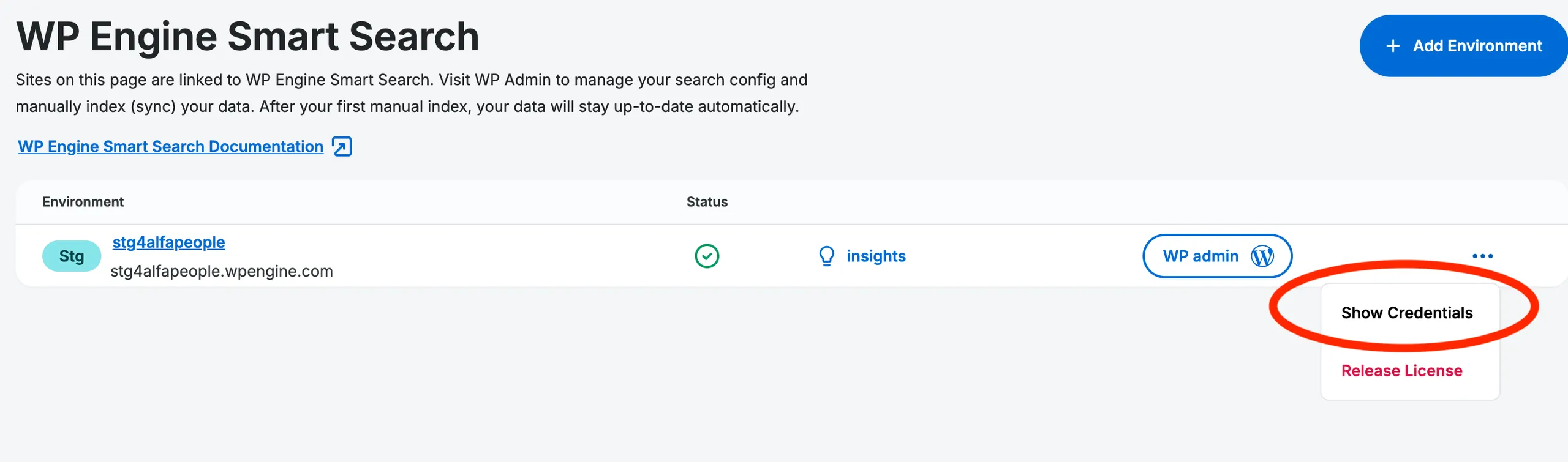
Section titled “Credentials”Your unique MCP endpoint URL and MCP token is located in the WP Engine User Portal. Go to the WP Engine Smart Search product page. Identify the associated environment and click the Show Credentials button. Copy the credentials ( MCP URL and MCP Token). These will be used for authentication.
Available MCP Tools (Endpoints)
Section titled “Available MCP Tools (Endpoints)”The Smart Search MCP exposes the following tools to the connected client:
Fetches a specific post by its ID directly from the connected index.
Parameters:
| Parameter | Required | Type | Description |
|---|---|---|---|
id | Yes | String/Integer | The unique identifier of the post to fetch. |
search
Section titled “search”Executes a search query against the connected index. Clients should be instructed to refine search queries as much as possible to ensure relevant context windows.
Parameters:
| Parameter | Required | Type | Description |
|---|---|---|---|
query | Yes | String | The primary search query. |
filter | No | String | A strict filter string supporting field targeting, boolean operators, wildcards, and ranges. See the Find API for full syntax details. Examples: field:value, field:(value1 OR value2), NOT field:value |
limit | No | Integer | Limits the number of results returned in the payload. |
offset | No | Integer | The offset used for pagination. |
Rate Limiting
Section titled “Rate Limiting”The MCP endpoints utilize a token bucket algorithm to handle traffic and protect against brute-force attacks.
1. Request Rate Limiter (General API Traffic)
Section titled “1. Request Rate Limiter (General API Traffic)”This limiter governs successful requests to the MCP tools.
Custom Code / LLM integrations:
- Rate: 5 Requests Per Second (RPS)
- Burst Capacity: Up to 30 requests
- Scope: IP-based
- Behavior: The bucket starts with 30 tokens. Each request consumes one token. Tokens refill at a steady rate of 5 per second. If the bucket hits 0, requests are rejected until the bucket refills at the steady RPS rate.
ChatKit integrations:
- Rate: 10 Requests Per Minute
- Scope: OpenAI session-level
Unauthenticated access:
- Rate: 5 RPS
- Burst Capacity: 10
- Scope: Shared globally to all usages
2. Auth Failure Limiter
Section titled “2. Auth Failure Limiter”This limiter specifically protects against brute-force authentication attempts.
- Rate: 1 allowed failure per 30 seconds
- Burst Capacity: 2 failed attempts
- Scope: IP-based
Connection Configuration
Section titled “Connection Configuration”Use your MCP URL and MCP token to configure the connection for your client. For platforms that do not support authentication headers, limited unauthenticated access is available.
ChatKit & Agent Builder
Section titled “ChatKit & Agent Builder”See the ChatKit configuration guide for setup details.
Claude Code (Terminal)
Section titled “Claude Code (Terminal)”Add the server directly via the command line using the Claude MCP add command with the http transport flag. Replace {your-mcp-url} with your /mcp URL and {your-mcp-token} with your MCP token.
claude mcp add --transport http search_mcp "{your-mcp-url}" --header "Authorization: Bearer {your-mcp-token}"Claude (Web Version) & ChatGPT Desktop (Developer Mode)
Section titled “Claude (Web Version) & ChatGPT Desktop (Developer Mode)”Configure your remote servers within their respective environments by using your /mcp URL. For platform-specific setup, see the Claude remote MCP guide and ChatGPT Developer Mode guide.
Custom Code (e.g., Headless WP)
Section titled “Custom Code (e.g., Headless WP)”Include your bearer token in the Authorization header of each request.
Authorization: Bearer {your-mcp-token}For implementation examples, see Smart Search MCP in Headless WP and Using MCP Servers in Concert.